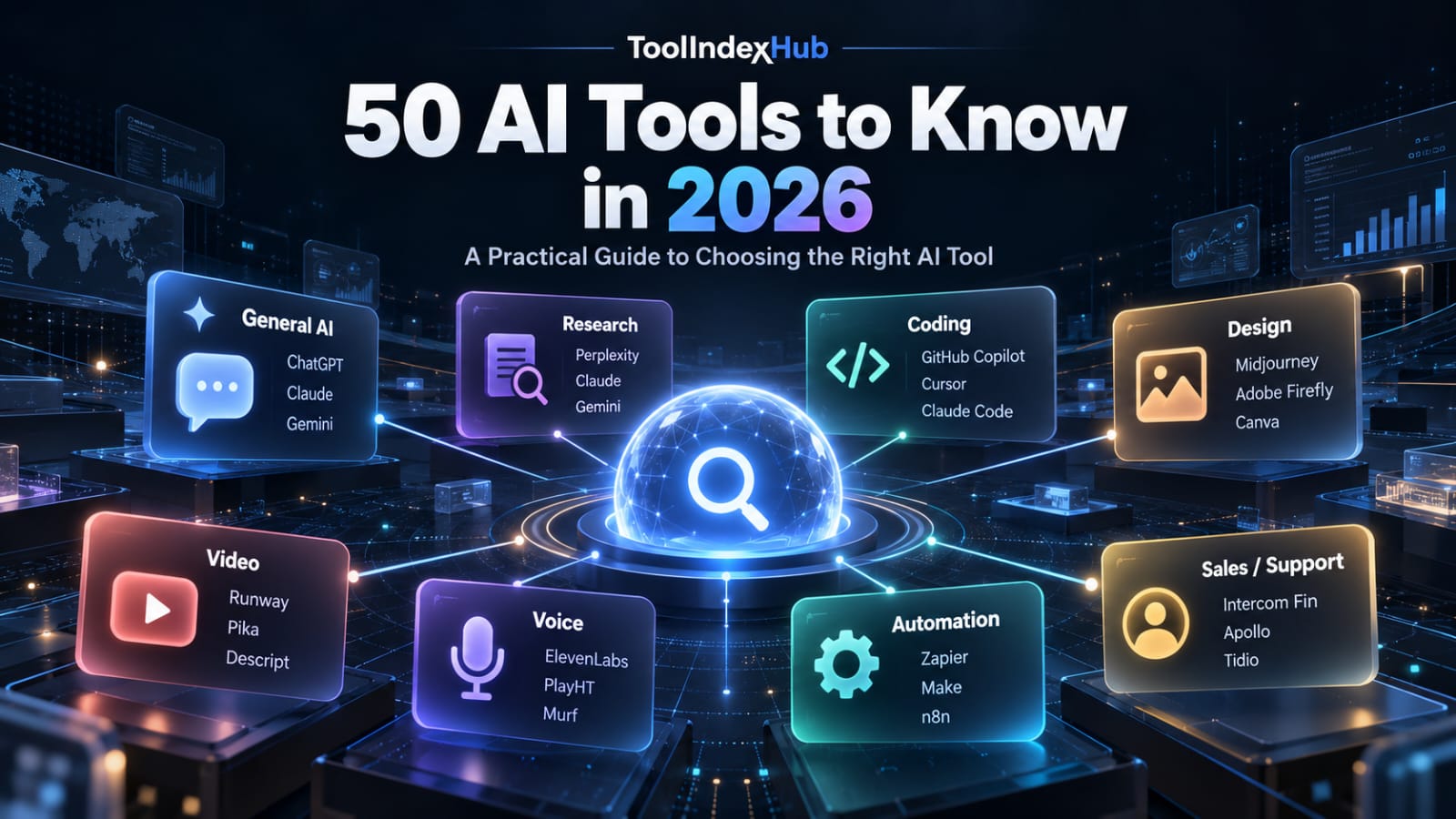
Artificial intelligence is no longer represented by one type of product.
Some AI tools help people research and write. Others generate images or videos, build software, automate business processes, transcribe meetings, create voice agents, analyze data, or support sales and customer service.
That variety creates a new problem: finding the right tool.
A tool that is excellent for coding may be irrelevant for a marketing team. A research assistant and a general-purpose chatbot may look similar at first, but they solve different problems. Even tools within the same category can differ significantly in workflow, integrations and intended users.
This guide introduces 50 notable AI tools across the main areas covered by ToolIndexHub. It is not a ranking from best to worst. Instead, it is designed to help you understand what each tool is mainly built for and where it may fit into your workflow.
Quick answer: What types of AI tools are available today?
The current AI landscape can broadly be divided into:
- General AI assistants and productivity tools
- Research and knowledge tools
- AI coding and app-development tools
- Image and design platforms
- AI video tools
- Voice, audio and meeting assistants
- Workflow automation and AI-agent platforms
- Sales and customer-support AI
The right choice depends less on which tool is most popular and more on what you actually need it to do.
---
General AI Assistants and Productivity Tools
1. ChatGPT
ChatGPT is a general-purpose AI assistant that can support writing, research, brainstorming, coding, document work and multimodal tasks.
Its broad scope makes it useful when your work crosses several categories rather than requiring one narrowly specialized application.
Useful for: general productivity, writing, research, coding and problem-solving.
2. Claude
Claude is a general AI assistant with a strong focus on writing, analysis, coding and knowledge-intensive work.
It can be particularly useful for tasks involving long documents, structured reasoning, software projects and detailed written analysis.
Useful for: analysis, document work, writing, research and development workflows.
3. Perplexity
Perplexity combines conversational AI with web research and source discovery.
Its main distinction is that research and citations are central to the experience, making it useful when users want to investigate a topic rather than simply generate text.
Useful for: web research, source discovery and question-driven investigation.
4. Gemini
Gemini is Google's multimodal AI assistant and is designed for tasks such as writing, planning, research and productivity.
Its connection with the broader Google ecosystem can also make it relevant to users already working heavily with Google services.
Useful for: general assistance, multimodal work and productivity.
5. Microsoft Copilot
Microsoft Copilot provides AI assistance across research, writing, creative tasks and the wider Microsoft environment.
For businesses already operating around Microsoft products, the broader ecosystem can be as important as the chatbot itself.
Useful for: productivity, research and Microsoft-centered workflows.
6. Grok
Grok is xAI's general-purpose assistant for conversational tasks including reasoning, writing, research, coding and multimodal interaction.
It competes in the same broad assistant category as ChatGPT, Claude, Gemini and Microsoft Copilot, while developing its own ecosystem and information workflows.
Useful for: general AI assistance, research and multimodal tasks.
7. NotebookLM
NotebookLM takes a different approach from a general chatbot.
Instead of beginning with the open web, it is designed around sources supplied to a notebook. Users can work with those materials through source-grounded questions, summaries and learning workflows.
Useful for: studying documents, source-based research and knowledge synthesis.
8. Notion AI
Notion AI brings artificial intelligence into the Notion workspace.
It can support writing, summarization, workspace search, knowledge retrieval and productivity within information that teams already manage in Notion.
Useful for: team knowledge, workspace productivity and writing.
9. Canva
Canva combines visual design with AI-assisted creation.
It serves a broad audience ranging from small businesses and marketers to creators and teams that need presentations, social content, graphics, brand materials and other visual assets without a complex professional design workflow.
Useful for: visual content, marketing assets, presentations and brand work.
10. Grammarly
Grammarly focuses on written communication.
Beyond basic grammar correction, it can assist with rewriting, clarity, tone and drafting across common professional communication environments.
Useful for: writing improvement, editing and professional communication.
---
Research and Knowledge Tools
11. Elicit
Elicit is designed for academic and evidence-focused research.
It helps researchers discover literature, work with papers and organize evidence for research questions and structured reviews.
Useful for: literature reviews, academic research and evidence extraction.
12. Consensus
Consensus focuses on finding and understanding evidence from academic research.
Users can ask questions in natural language and investigate findings from scientific literature rather than relying solely on conventional keyword search.
Useful for: research questions, scientific evidence and literature discovery.
13. SciSpace
SciSpace provides AI-assisted tools for discovering, understanding and working with academic papers.
It is particularly relevant to students and researchers dealing with dense scientific literature.
Useful for: paper discovery, literature understanding and academic workflows.
14. Julius AI
Julius AI focuses on data analysis through natural-language interaction.
Users can work with datasets, explore information, produce charts and perform analytical tasks without approaching every problem through a traditional coding interface.
Useful for: spreadsheet analysis, data exploration and visualization.
---
AI Coding and App-Development Tools
15. GitHub Copilot
GitHub Copilot brings AI assistance into software-development workflows.
It supports developers with coding assistance and increasingly extends beyond simple code completion into broader development and repository workflows.
Useful for: professional software development and coding assistance.
16. Cursor
Cursor is an AI-focused code editor designed around codebase-aware development.
Rather than treating AI as a separate chat window, it integrates AI deeply into the development environment.
Useful for: developers who want AI embedded directly into their coding workflow.
17. Claude Code
Claude Code is Anthropic's coding agent designed to work directly with software projects.
It can inspect repositories, edit files, work through development tasks and assist with testing and debugging workflows.
Useful for: repository-level software development and agentic coding.
18. Codex
Codex is OpenAI's coding agent for software-engineering work.
It is intended to work with codebases and development tasks rather than limiting AI assistance to isolated code snippets.
Useful for: coding tasks, repository work and software engineering.
19. Replit
Replit combines browser-based development, AI assistance, application building and deployment.
Its integrated approach can reduce the number of separate tools required to move from an idea to a functioning application.
Useful for: rapid application development and browser-based coding.
20. Lovable
Lovable focuses on building web applications from natural-language instructions.
It is particularly interesting for founders, product teams and less-technical users who want to turn product ideas into working web interfaces quickly.
Useful for: AI-assisted web-app creation and prototyping.
21. v0
v0 is Vercel's AI application-building platform.
It is strongly associated with modern web-interface generation and can help users move from prompts to editable frontend and application code.
Useful for: frontend development, UI creation and web prototypes.
---
AI Image and Design Tools
22. Midjourney
Midjourney is primarily known for generative imagery and creative visual exploration.
It is widely used for concept development, illustration, artistic experimentation and visual ideation.
Useful for: creative images, concept art and visual experimentation.
23. Adobe Firefly
Adobe Firefly brings generative AI into Adobe's creative ecosystem.
Its value is particularly relevant to people already working with professional design and media-production workflows.
Useful for: generative design and professional creative workflows.
24. Ideogram
Ideogram is an AI image and design platform with particular attention to typography and text within generated visuals.
That makes it relevant when a design needs both imagery and readable text.
Useful for: posters, branded visuals and typography-heavy image generation.
25. Leonardo.Ai
Leonardo.Ai provides AI image-generation and editing capabilities for creative workflows.
It serves users ranging from individual creators to teams using generative media as part of a broader production process.
Useful for: image generation, visual development and creative production.
26. Figma
Figma is already a major collaborative product-design environment, and AI is becoming part of its design and prototyping workflow.
Its role extends beyond generating graphics: designers and product teams can connect design, prototyping and development more closely.
Useful for: UI/UX design, product design and collaborative prototyping.
27. Napkin AI
Napkin AI turns written information and ideas into explanatory visuals.
It can help create diagrams, visual summaries and other communication assets when plain text alone is difficult to understand.
Useful for: diagrams, visual explanations and business communication.
28. Gamma
Gamma uses AI to help create visual presentations, documents and web-style content.
Its strength is turning information into structured, presentable material without requiring users to manually design every slide or page.
Useful for: presentations, documents and visual communication.
---
AI Video and Creative Media Tools
29. Runway
Runway is a generative-media platform with a strong focus on AI video.
It combines generation and creative editing tools for users working with professional or experimental media production.
Useful for: AI video generation and creative production.
30. Sora
Sora is OpenAI's generative video product.
It is designed around creating and transforming visual scenes using AI, placing it within the rapidly developing text-to-video and generative-media market.
Useful for: generative video and visual storytelling.
31. HeyGen
HeyGen focuses heavily on AI-presenter and avatar-based video.
Businesses can use this type of platform to create presenter-led content without filming every version manually.
Useful for: marketing videos, multilingual content and AI presenters.
32. Synthesia
Synthesia also focuses on AI-avatar video, particularly for business communication.
Training, onboarding, explainers and localized corporate content are natural use cases.
Useful for: business training, onboarding and presenter-led videos.
33. Pika
Pika focuses on accessible generative video creation and visual effects.
It is particularly relevant to creators experimenting with shorter-form AI-generated media.
Useful for: creative short-form video and AI effects.
---
Voice, Audio and Meeting AI
34. ElevenLabs
ElevenLabs focuses on AI voice technology.
Its capabilities span synthetic speech and other voice-related workflows, making it relevant to creators, developers and businesses building spoken experiences.
Useful for: AI voice, text-to-speech and voice-enabled applications.
35. Deepgram
Deepgram provides speech-AI infrastructure aimed strongly at developers.
Its technology can support speech recognition, synthetic speech and real-time voice applications.
Useful for: transcription APIs and voice-AI development.
36. Descript
Descript combines transcription with audio and video editing.
Its text-based editing approach can make media production more approachable for podcasts, interviews, videos and team content.
Useful for: podcasts, video editing and transcription-based media workflows.
37. Suno
Suno applies generative AI to music creation.
Users can develop songs and musical ideas from prompts rather than beginning with a traditional digital audio-production workflow.
Useful for: AI-generated music and creative experimentation.
38. Udio
Udio is another generative-music platform designed around creating and iterating on music with AI.
It is part of a broader shift toward prompt-assisted music creation and remix workflows.
Useful for: music generation and song experimentation.
39. Otter.ai
Otter.ai is designed around meetings, transcription and searchable conversation records.
Its goal is to reduce the amount of manual note-taking required during conversations.
Useful for: meeting transcription, notes and team knowledge.
40. Fireflies.ai
Fireflies.ai combines meeting transcription with conversation intelligence and follow-up workflows.
It can help teams retain searchable information from calls and meetings rather than allowing that knowledge to disappear after the conversation ends.
Useful for: meeting records, summaries and conversation workflows.
41. Fathom
Fathom is an AI meeting assistant designed around recording, transcription, summaries and useful meeting notes.
For professionals who spend significant time in video meetings, this category of tool can reduce post-meeting administrative work.
Useful for: meeting summaries and follow-up information.
42. Granola
Granola combines AI transcription with the user's own meeting notes.
Instead of treating machine-generated notes as the only source, it is designed to help turn human notes and meeting context into a more structured record.
Useful for: structured meeting notes and knowledge capture.
---
Automation and AI-Agent Platforms
43. n8n
n8n is a workflow-automation platform with strong appeal to technical teams.
It combines visual automation with code-friendly extensibility and can support AI-agent workflows as well as conventional application automation.
Useful for: technical automation, AI workflows and flexible orchestration.
44. Zapier
Zapier is one of the best-known application-automation platforms.
It connects business applications and allows users to automate repetitive processes without manually moving information between systems.
AI is increasingly becoming another layer within those automated workflows.
Useful for: business automation and connecting applications.
45. Make
Make provides a visual environment for building multi-step automated workflows.
Its visual workflow model can be useful when processes involve multiple applications, conditions and data transformations.
Useful for: visual workflow automation and business processes.
46. Vapi
Vapi is focused on infrastructure for building real-time AI voice agents.
Rather than being a conventional end-user chatbot, it is relevant to developers and companies creating phone-based AI applications.
Useful for: programmable voice agents and AI calling applications.
47. Retell AI
Retell AI is another platform focused on production voice agents.
It is designed around creating and operating AI phone experiences for real-world business use cases.
Useful for: AI phone agents and voice automation.
---
Sales and Customer-Support AI
48. Gong
Gong applies AI to revenue and sales workflows.
It is centered on customer interactions, conversation intelligence and information that can help revenue teams understand deals and sales activity.
Useful for: sales intelligence and revenue operations.
49. Fin
Fin is Intercom's AI agent for customer-facing conversations.
It is designed for customer-support environments where AI can handle suitable requests while working alongside human support operations.
Useful for: AI customer service and support automation.
50. Apollo
Apollo combines B2B sales intelligence with prospecting and engagement workflows.
Its role is less about general AI conversation and more about helping sales teams identify, research and engage potential customers.
Useful for: B2B prospecting, sales intelligence and outreach workflows.
---
Which AI Tool Should You Choose?
There is no single AI tool that is right for every user.
A better way to choose is to begin with the task.
If you need a flexible assistant for many different activities, start by comparing general-purpose tools such as ChatGPT, Claude, Gemini, Microsoft Copilot or Grok.
If your work depends heavily on sources and research, tools such as Perplexity, NotebookLM, Elicit, Consensus and SciSpace deserve closer attention.
Developers may want to compare GitHub Copilot, Cursor, Claude Code, Codex, Replit, Lovable and v0 according to how much control they want over the development process.
Creative teams have an entirely different decision to make. Midjourney, Adobe Firefly, Ideogram and Leonardo.Ai focus more heavily on imagery, while Runway, Sora, HeyGen, Synthesia and Pika address different parts of AI video creation.
Businesses looking for automation should investigate n8n, Zapier and Make, while companies building conversational voice systems may find platforms such as Vapi, Retell AI, ElevenLabs or Deepgram more relevant.
The important point is simple:
Do not choose an AI tool because it is popular. Choose it because its workflow matches the problem you need to solve.
---
Frequently Asked Questions
What is the best AI tool?
There is no universal best AI tool. The right choice depends on the task, required integrations, level of technical control, budget and workflow.
Which AI tools are useful for research?
General research can involve tools such as Perplexity and NotebookLM, while Elicit, Consensus and SciSpace are more focused on academic or evidence-oriented research.
Which AI tools can help with coding?
GitHub Copilot, Cursor, Claude Code and Codex focus strongly on coding and software-development workflows. Replit, Lovable and v0 also help users move from ideas toward working applications.
Which AI tools can generate images?
Midjourney, Adobe Firefly, Ideogram and Leonardo.Ai are among the tools focused strongly on generative images and visual creation.
Which AI tools can create videos?
Runway, Sora, HeyGen, Synthesia and Pika represent different approaches to AI-assisted video creation, ranging from generative scenes to avatar-led business videos.
What AI tools can automate business workflows?
n8n, Zapier and Make are prominent workflow-automation platforms, while Vapi and Retell AI focus more specifically on AI voice-agent workflows.
How should I compare AI tools?
Compare tools according to the specific job you need done. Consider capabilities, workflow, integrations, accessibility, platform support, pricing, data requirements and whether the product is intended for individuals, developers or businesses.
---
A Better Way to Discover AI Tools
The AI market changes quickly. New tools appear, established products add features, pricing changes and capabilities that once required separate applications increasingly overlap.
That makes static lists less useful over time.
ToolIndexHub is being developed around a more practical idea: help people discover and understand AI tools through structured information rather than hype alone.
Instead of assuming that the most visible tool is automatically the right one, users should be able to explore tools by category, use case and relevant product information.
The goal is not to tell everyone to use the same AI product.
The goal is to make the decision easier.
Explore AI tools on ToolIndexHub and find the tools that fit the work you actually need to do.
---
Editorial note: AI products evolve rapidly. Features, availability and commercial terms can change. Check the latest product information before making an important purchasing or implementation decision.